
Lot Traceability: A Complete Guide for Wholesale Distributors
Reviewed by Pablo Gil, CEO of inSitu Sales. Pablo was involved in the project implementation and has reviewed this article.
Lot traceability is the ability to identify where a specific product lot came from, where it moved, and which customers received it. An effective system connects receiving, warehouse inventory, order fulfillment, delivery, returns, and recalls through accurate lot-level records.
For wholesale distributors, simply recording a lot number is not enough. Every inventory movement must preserve the link between the physical product and its digital history. If that link breaks during picking, repacking, truck loading, or delivery, the company may be unable to conduct an accurate recall.
This guide explains how lot traceability works, what information to capture, how to configure warehouse processes, and how to test whether your system is genuinely recall-ready.
WORKED EXAMPLE · LOT JX-0428
Follow one lot from the warehouse to the truck, customer and return.
A useful lot test connects the receipt, stock movement, customer transaction and return. Use the same product, lot and unit of measure at every step, then compare the records with a physical count.
| Step | Balance in cases | Record and check |
|---|---|---|
| Receive 120 cases | Main warehouse: 120 | Record SKU JUICE-24, lot JX-0428, expiry and unit of measure on the receipt. Keep the supplier and receipt reference. |
| Load Truck 01 with 40 | Warehouse: 80; truck: 40 | Select the same product and lot on the warehouse-to-truck transfer. Verify both location balances. |
| Sell 25 to Customer A | Warehouse: 80; truck: 15; A: 25 | Select the lot on the eligible mobile invoice line. Confirm the synchronized invoice retains customer, lot and quantity. |
| Sell 10 to Customer B | Warehouse: 80; truck: 5; A: 25; B: 10 | Record the second invoice against the same product and lot. Search by both product and lot in the invoice-by-lot report. |
| Customer A returns 2 | Warehouse: 80; truck: 5; A: 23; B: 10; returns: 2 | Capture returned quantity and lot. Reconcile against the original invoice and keep these cases separate pending inspection under your agreed return procedure. |
| Unload the remaining 5 | Warehouse: 85; truck: 0; customers: 33; returns: 2 | Record the remaining truck-to-warehouse transfer. Count the returned cases separately so they are not also included in available warehouse stock. |
Final reconciliation: 120 received = 85 in the warehouse + 33 still with customers + 2 returned cases awaiting inspection. Transfers change location, not the total quantity. The 2 returned cases have already been removed from the customer balance; do not count them there again.
What inSitu supports in this workflow
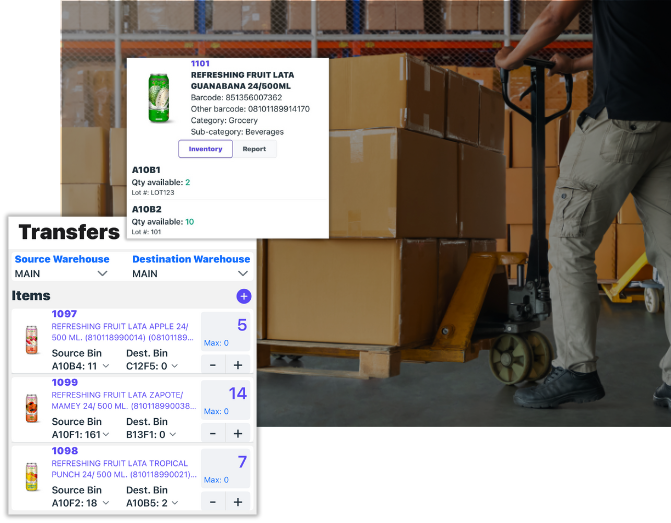
- Receiving and inventory: supported inSitu Inventory screens capture lot numbers and expiration dates, show lot stock by bin, and allow source-lot selection during transfers.
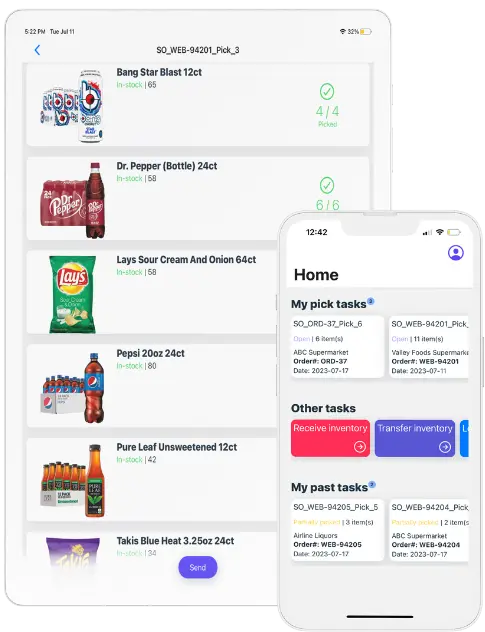
- Mobile sales and returns: supported inSitu Sales transaction workflows carry lot details on sales lines and capture lot and quantity on returns. Confirm the enabled transaction types and required-field settings for your team.
- Customer lookup: the invoice-by-lot report searches by product and lot and shows recorded invoice/customer, warehouse, quantity and available bin information. Check the date range and sync completion before interpreting the results.
Product views to review during your demo
Confirm these boundaries before launch
- Returns and holds: lot capture does not establish automatic quarantine, resale blocking or a link to the original invoice. Confirm those controls and who approves disposition.
- Expiration and allocation: recording an expiration date does not establish automatic FEFO, customer shelf-life enforcement or recall blocking. Test each required rule.
- Offline and synchronization: test the selected lot with the device offline, reconnect, and verify the saved server record and final location balance. A local record is not proof that the accounting system has accepted it.
- Integration and genealogy: confirm whether each connected ERP preserves the lot fields. Repacking, production genealogy and regulator-ready exports need separate scope validation.
Run a mock trace after the return
- Find the receipt for product JUICE-24 and lot JX-0428, then inspect each transfer.
- Search invoices by the same product and lot. The illustrative outbound total is 35 cases across Customer A and Customer B; this is not the 33-case net customer balance after the return.
- Reconcile the 2-case return separately, including its original invoice reference and final disposition. An invoice-only report does not prove the return or its condition.
- Count warehouse, truck and held returns. Explain every difference from the 120-case receipt before closing the test.
What Is Lot Traceability?
Lot traceability tracks products that were produced, processed, packaged, or received as a defined group. That group is assigned a lot number or batch number, which follows the inventory through the supply chain.
A complete lot history should answer five questions:
- What product was handled?
- Which lot did it belong to?
- Where did it come from and go?
- When did each inventory event occur?
- Who supplied, handled, shipped, or received it?
For example, imagine a distributor receives 120 cases of juice identified as Lot JX-0428. A functional traceability system should show:
- The supplier that shipped the lot
- The purchase order and receipt date
- The warehouse and bins where it was stored
- Every internal transfer
- The orders on which it was picked
- The trucks onto which it was loaded
- The customers that received it
- The quantities remaining, returned, damaged, or destroyed
A spreadsheet containing “JX-0428” is not sufficient unless it preserves all these relationships. A modern warehouse inventory and lot tracking system should preserve lot information from receiving through picking, packing, delivery, and returns.
Lot vs. batch vs. serial number
The terms lot and batch are often used interchangeably. Both identify a group of products associated with the same production or handling process.
A serial number, by contrast, identifies one individual item.
According to the GS1 Global Traceability Standard, traceable products can be identified at three principal levels:
- Product level: The system distinguishes one type of product from another.
- Batch or lot level: The system distinguishes units of the same product that belong to different lots.
- Serialized level: The system uniquely identifies every individual unit.
Lot-level tracking is normally appropriate when a quality problem is likely to affect a production group, while serialization may be required for high-value, high-risk, or tightly regulated products.
The Three Directions of Lot Traceability
A distributor must be able to trace inventory in more than one direction.
Backward traceability
Backward traceability identifies where a product originated. It connects a lot to its supplier, purchase order, production source, and receiving records.
If a customer reports a defective product, backward tracing should reveal:
- The product’s lot number
- The supplier or manufacturer
- When the lot was received
- The quantity received
- Other lots received in the same shipment
- Available quality or inspection records
Forward traceability
Forward traceability identifies where products from a lot went.
If a supplier announces that Lot JX-0428 is contaminated, forward tracing should immediately show:
- Which customers received it
- The dates and quantities delivered
- Which invoices or shipments contained it
- Whether any product remains in transit
- Whether any units were returned or credited
Internal traceability
Internal traceability records every event that occurs while the inventory is under the distributor’s control.
That includes:
- Receiving
- Labeling
- Putaway
- Bin transfers
- Replenishment
- Picking
- Packing
- Truck loading
- Delivery
- Returns
- Quarantine
- Destruction
A company may have strong supplier and customer records but still lack true traceability if internal movements are not recorded.
Why Lot Traceability Matters
Faster, narrower recalls
Without lot-level records, a distributor may need to recall every unit of a product—even when only one production lot is affected.
Accurate traceability narrows the recall radius to the specific:
- Lot
- Derived or related lots
- Warehouse locations
- Shipments
- Customers
- Delivery dates
- Remaining quantities
A smaller recall can reduce product loss, transportation expenses, customer disruption, and reputational damage.
Regulatory compliance
Traceability requirements vary by product, jurisdiction, and the distributor’s role in the supply chain.
For certain foods, the FDA Food Traceability Rule requires covered organizations to maintain Key Data Elements, or KDEs, associated with defined Critical Tracking Events, or CTEs. Covered events include receiving, shipping, transformation, initial packing, and other activities depending on the organization.
Covered records may need to be provided to the FDA within 24 hours. The federal government has directed the FDA not to enforce the rule before July 20, 2028. The requirements themselves have not been eliminated. Businesses should use the additional time to coordinate their data and procedures with supply-chain partners. Review the current requirements on the FDA Food Traceability Rule page.
Companies should obtain advice appropriate to their products and jurisdictions rather than treating a WMS configuration as legal compliance by itself.
Better expiration management
Lot records enable a warehouse to allocate products according to:
- Manufacturing date
- Expiration date
- Best-by date
- Customer shelf-life requirements
- Quality status
This supports first-expired, first-out, or FEFO, fulfillment and reduces the risk of shipping short-dated inventory to customers that require a minimum remaining shelf life.
Stronger supplier accountability
When quality complaints are linked to specific suppliers and lots, distributors can identify patterns such as:
- Repeated damage
- Incorrect expiration dates
- Labeling failures
- Inconsistent fill quantities
- High return rates
- Short shelf life at receipt
Lot-level reporting transforms isolated complaints into measurable supplier-performance data.
Which Businesses Need Lot Tracking?
Lot traceability is especially important for organizations handling:
- Food and beverages
- Dietary supplements
- Pharmaceuticals
- Cosmetics
- Chemicals
- Medical products
- Automotive parts
- Electronics
- Seeds and agricultural inputs
- Batch-manufactured components
- Products with expiration dates
- Products subject to supplier or regulatory recalls
It is also valuable for distributors that are not explicitly required to track lots. Retailers and institutional buyers increasingly expect suppliers to provide accurate recall and product-origin information.
The Data Required for Reliable Lot Traceability
A lot number alone cannot reconstruct a product’s history. Each traceability event should contain enough information to connect the product, location, quantity, transaction, and responsible party.
| Data category | Recommended fields |
|---|---|
| Product | SKU, GTIN, description and unit of measure |
| Lot | Supplier lot, internal lot and parent or child lot |
| Dates | Manufacturing, receiving, best-by and expiration dates |
| Quantity | Received, transferred, picked, shipped, returned and remaining quantities |
| Source | Supplier, purchase order, shipment and production facility |
| Location | Warehouse, zone, bin, pallet, truck and customer destination |
| Transaction | Receipt, transfer, pick, invoice, shipment, return or adjustment |
| Status | Available, held, quarantined, rejected, recalled or destroyed |
| Audit information | User, device, date, time and reason code |
| Customer linkage | Customer, ship-to location, invoice, route and proof of delivery |
Every inventory event should be timestamped. When possible, the system should also record the user and device that performed the transaction.
How Lot Traceability Works Across the Distribution Cycle
Receiving
Traceability begins at the receiving dock. If lot information is incomplete or inaccurate at receipt, every later record inherits the problem.
The receiving workflow should require workers to:
- Scan or select the purchase order.
- Identify the product.
- Scan or enter the supplier lot number.
- Record manufacturing and expiration dates when applicable.
- Record the quantity and unit of measure.
- Inspect the product and label.
- Assign an inventory status.
- Print an internal label if the supplier label cannot support downstream scanning.
The system should prevent workers from receiving lot-controlled products without the required fields.
A supervisor-controlled exception process may be necessary for unreadable labels or emergency receipts. Those exceptions should create an audit record rather than silently bypassing traceability.
Labeling
The physical label must remain connected to the system record throughout the inventory’s life.
A useful label may include:
- Product name
- GTIN or SKU
- Lot number
- Manufacturing date
- Expiration date
- Quantity
- Unit of measure
- Pallet or container identifier
- Human-readable values
- Scannable barcode
GS1 Application Identifier (10) is used for a batch or lot number. The lot must be associated with the relevant product identifier, such as a GTIN. Additional identifiers may represent expiration dates, serial numbers, or logistic units. See the GS1 Logistic Label Guideline when designing standardized labels.
Putaway and storage
A warehouse does not necessarily need a separate bin for every lot. Multiple lots can share a location when the WMS and physical controls can reliably distinguish them.
The correct approach depends on:
- Product risk
- Bin configuration
- Container or pallet identification
- Scanner enforcement
- Picking method
- Inventory volume
Lot segregation may be appropriate for sensitive products. In other environments, container-level license plates can preserve traceability without consuming unnecessary warehouse space.
Replenishment and transfers
Every transfer must preserve the lot and quantity.
If 20 cases from Lot JX-0428 move from overstock Bin A-10 to picking Bin P-04, the system should create a movement record showing:
- Source location
- Destination location
- Lot
- Quantity
- Date and time
- Employee
- Resulting balance in each location
Unrecorded replenishment is a common traceability failure because the physical product moves while the system believes it remains somewhere else.
Presales and B2B ordering
Lot assignment usually occurs during allocation or picking rather than when a customer initially places an order.
A presales app or B2B online ordering system should still pass the following information into fulfillment:
- Product and unit of measure
- Customer
- Ship-to location
- Requested delivery date
- Customer shelf-life requirements
- Product restrictions
- Warehouse or inventory source
The fulfillment system can then assign an eligible lot based on FEFO, availability, quality status, and customer rules.
Picking
The picking process should verify both the product and lot.
A scan-enforced workflow can require the picker to:
- Scan the bin.
- Scan the product.
- Scan the lot or pallet identifier.
- Confirm the quantity.
- Record any shortage, substitution, or damage.
The WMS should block a recalled, quarantined, expired, or otherwise restricted lot even if it is physically available.
Packing and shipping
Packing is the final warehouse control before inventory reaches the customer or delivery truck.
The shipment record should link:
- Customer
- Ship-to address
- Sales order
- Invoice
- Product
- Lot
- Quantity
- Pallet or carton
- Carrier or delivery route
- Shipment date
If several lots satisfy one order line, every lot and its respective quantity must be recorded.
Dispatch and DSD
Lot traceability must continue after the product leaves the warehouse.
For direct store delivery or van sales, the system should track:
- The lot loaded onto each truck
- Transfers between warehouse and truck inventory
- Lots delivered at each stop
- Customer returns
- Damaged products
- Refused deliveries
- Inventory remaining during driver settlement
The invoice or delivery record should preserve the lot received by the customer. Otherwise, the traceability chain ends at the loading dock.
Returns
Returned products create difficult traceability decisions.
The return process should determine:
- Original invoice
- Original lot
- Return reason
- Product condition
- Expiration status
- Whether the product remained under acceptable storage conditions
- Final disposition
Returned inventory should not automatically become available for sale. It may require inspection, quarantine, destruction, or supplier return.
Handling Lot Splits, Merges, Repacking, and Transformation
Lot genealogy records how one lot relates to another.
This becomes essential when inventory is:
- Repacked into smaller units
- Combined into a kit
- Used as a production ingredient
- Relabeled
- Split between several pallets
- Mixed with another lot
- Converted into another unit of measure
- Used to manufacture a finished product
Suppose a distributor uses Ingredient Lots A17 and B09 to create Finished Product Lot C24. The traceability system must preserve both directions:
- Backward: Lot C24 came from A17 and B09.
- Forward: Portions of A17 and B09 were used in C24.
If Lot A17 is recalled, the system must identify Lot C24 and every customer that received it.
GS1 traceability guidance emphasizes retaining the relationship between input and output objects during transformation. Losing this relationship can expand a targeted ingredient recall into a recall of every finished product made during a broad time period.
FIFO, FEFO, Shelf Life, and Quality Status
FIFO
First-in, first-out allocates older receipts before newer receipts. FIFO is suitable when receipt sequence matters but expiration dates do not vary significantly.
FEFO
First-expired, first-out prioritizes the lot with the earliest expiration date. FEFO is generally more appropriate for perishable products because a lot received later may expire earlier.
Customer shelf-life rules
Some customers require a minimum number of days remaining at delivery. A system may need to prevent allocation when a lot does not meet that requirement.
For example:
- Lot A expires in 45 days.
- Lot B expires in 120 days.
- Customer X requires at least 90 days of shelf life.
- Customer Y accepts at least 30 days.
Lot A may be eligible for Customer Y but blocked for Customer X.
Quality and recall statuses
At a minimum, lot-controlled inventory should support statuses such as:
- Available
- On hold
- Quarantined
- Rejected
- Recalled
- Expired
- Damaged
- Pending inspection
- Released
- Destroyed
Status controls must affect allocation and picking—not merely appear in a report.
How to Configure a WMS for Lot Traceability
1. Map the physical workflow
Document how inventory currently moves from receiving through delivery and returns. Include manual processes, temporary staging areas, and after-hours exceptions.
2. Define lot-controlled products
Determine which products require:
- Lot numbers
- Expiration dates
- Manufacturing dates
- Serial numbers
- Quality inspections
- Shelf-life rules
3. Establish lot-number rules
Decide whether the organization will retain supplier lot numbers, generate internal lot numbers, or use both.
Avoid reusing the same lot identifier across unrelated products unless the product identifier is always stored with it.
4. Define mandatory data
Determine which fields must be captured at each event. Receiving may require supplier, lot, quantity, and expiration date, while shipping requires customer, destination, lot, and quantity.
5. Configure scan enforcement
Decide where the system must require scans and where manual selection is acceptable. High-risk events should not depend on memory or free-text entry.
6. Configure allocation rules
Set up:
- FIFO or FEFO
- Shelf-life requirements
- Warehouse priorities
- Lot restrictions
- Quality holds
- Customer-specific rules
7. Integrate connected systems
Define which application owns each record and how updates flow between the WMS, ERP, DSD software, eCommerce portal, and shipping platform.
8. Test exceptions
Do not test only perfect transactions. Test:
- Mixed-lot orders
- Partial picks
- Unreadable barcodes
- Returns
- Inventory adjustments
- Offline operations
- Quarantined inventory
- Repacking
- Recalled inventory in transit
9. Conduct user acceptance testing
Warehouse workers should perform realistic transactions with production-like products, labels, scanners, and quantities.
10. Pilot before full rollout
Begin with a limited group of products, workers, or warehouse areas. Measure traceability completeness before expanding.
Integrating Traceability Across Business Systems
Lot traceability frequently spans several applications.
| System | Typical responsibility |
|---|---|
| ERP or accounting system | Suppliers, customers, purchasing, invoicing and financial inventory |
| WMS | Receiving, bins, movements, picking, packing and warehouse lot balances |
| DSD platform | Truck inventory, customer delivery, returns, payment and proof of delivery |
| B2B eCommerce | Customer orders, catalog, pricing and ship-to information |
| Manufacturing system | Input-to-output lot genealogy |
| Shipping platform | Packages, carriers, tracking numbers and shipment events |
| Customer-service system | Complaints, notifications and recall acknowledgments |
A technically successful integration can still fail traceability if it transfers product and quantity but omits the lot number.
Integration testing must verify the complete business record—not merely whether an order successfully arrived.
How to Conduct a Lot Recall
1. Identify the suspect lot
Confirm the product, lot, supplier, risk, and reason for the recall.
2. Place inventory on hold
Block the affected lot and any related lots from allocation, picking, loading, or shipment.
3. Trace backward
Identify the supplier, purchase order, receiving event, manufacturing information, and related source lots.
4. Trace forward
Identify every warehouse, truck, shipment, invoice, customer, and destination that received the lot.
5. Reconcile the quantity
Count each physical unit once using mutually exclusive positions at the same cutoff time:
Received or produced = available on hand + held returns + net quantity still with customers + destroyed + other documented exits + unexplained variance.
For example, 1,000 received units could be 180 available on hand, 30 held returns, 760 still with customers, 20 destroyed and 10 unexplained. That accounts for 990 units, or 99%; investigate the remaining 10. If your on-hand report already includes the 30 returns, subtract them from that category before listing them separately. Use net customer quantities after returns, not gross historical shipments.
6. Notify affected parties
Provide clear information about:
- Product
- Lot
- Quantity
- Risk
- Required action
- Return or destruction instructions
- Response deadline
- Contact information
7. Track responses and recovery
Record customer acknowledgments, recovered quantities, destroyed quantities, and unresolved product.
8. Document closure
Preserve the timeline, reports, communications, reconciliation, decisions, and corrective actions.
How to Run a Mock Recall
A mock recall tests whether the system and team can perform under realistic conditions.
Select a lot that has moved through several warehouse and customer transactions. Do not choose the easiest possible example.
Measure:
- Time to identify the supplier
- Time to identify affected customers
- Percentage of quantity reconciled
- Number of manual records required
- Number of missing transactions
- Customer-contact completeness
- Accuracy of on-hand inventory
- Whether related transformed lots were identified
A mock recall should produce a written corrective-action plan for every gap. Running the test without fixing the failures provides little value.
Common Lot-Traceability Failures
Watch for these recurring problems:
- Lot numbers entered as free text
- Duplicate or inconsistent lot formats
- Supplier labels that cannot be scanned
- Products moved without scanning
- Lots lost during repacking
- Multiple lots combined without genealogy
- Inventory adjustments without reasons
- Returns disconnected from original invoices
- Truck inventory tracked only by product
- Integrations that omit lot fields
- Recalled inventory remaining available
- Expiration dates stored but not used for allocation
- Manual emergency processes that never reach the system
Lot-Traceability KPIs
A traceability program should be measurable.
Useful KPIs include:
- Traceability completeness: Percentage of required movements containing valid lot data
- Scan compliance: Percentage of lot-controlled transactions completed by scanning
- Mock-recall completion time: Time required to identify affected inventory and customers
- Quantity reconciliation: Percentage of the lot successfully accounted for
- Unidentified inventory: Quantity physically present without a valid lot
- Expiration loss: Value of inventory discarded because of expiration
- Quarantine aging: Average time inventory remains on quality hold
- Return linkage: Percentage of returns connected to an original lot and invoice
- Supplier-label compliance: Percentage of receipts with complete, scannable labels
- Recall-response completion: Percentage of affected customers that acknowledged the notice
These metrics should be reviewed by operations, quality, and management—not only during an audit.
Lot-Traceability Software Checklist
Before selecting a WMS or connected distribution platform, confirm whether it can:
- Capture lot and expiration information at receiving
- Enforce lot scans during movements and picking
- Support FIFO and FEFO
- Apply customer shelf-life rules
- Track lots across multiple warehouses
- Track warehouse-to-truck transfers
- Record lots on invoices and deliveries
- Preserve lot information in offline workflows
- Manage quarantine and recall statuses
- Prevent allocation of blocked lots
- Create input-to-output lot genealogy
- Trace customer returns
- Reconcile lot quantities
- Generate forward and backward trace reports
- Preserve user and timestamp audit trails
- Export records in a regulator- or customer-usable format
- Integrate lot data with the ERP
- Support standardized barcodes
- Restrict manual overrides
- Scale without losing historical records
Ask vendors to demonstrate these scenarios with realistic transactions. A checked feature box is less valuable than watching the system execute a receipt, split, shipment, return, and recall.
Lot-Traceability Implementation Checklist
Planning
- Identify regulated and high-risk products.
- Map inventory and information flows.
- Assign process owners.
- Define traceability goals and recall targets.
- Document supplier requirements.
Configuration
- Define required lot fields.
- Configure labels and scanners.
- Establish FIFO or FEFO rules.
- Configure quality statuses.
- Build integrations.
- Create user permissions.
Testing
- Test normal warehouse transactions.
- Test splits, merges, and transformations.
- Test returns and adjustments.
- Test offline operations.
- Test blocked inventory.
- Conduct a mock recall.
Launch
- Train each operational role.
- Pilot selected products.
- Monitor scan compliance.
- Review daily exceptions.
- Correct master-data problems.
Continuous improvement
- Run periodic mock recalls.
- Audit physical-to-system balances.
- Review supplier-label quality.
- Measure recall and traceability KPIs.
- Update SOPs when workflows change.
Frequently Asked Questions
What is the difference between lot tracking and batch tracking?
The terms are usually interchangeable. Both identify a group of products associated with the same production or handling process. The exact definition may vary by company or industry.
Is lot traceability legally required?
It depends on the product, industry, jurisdiction, and the organization’s role in the supply chain. Certain foods, pharmaceuticals, medical products, chemicals, and other regulated goods may have specific requirements. Consult the applicable regulator and qualified compliance professionals.
Can multiple lots be stored in one bin?
Yes, if the WMS and physical controls can reliably distinguish each lot and quantity. Higher-risk products may require physical segregation.
What is the difference between FIFO and FEFO?
FIFO ships the oldest receipt first. FEFO ships the lot with the earliest expiration date first. FEFO is generally more appropriate for perishable inventory.
What is a Traceability Lot Code?
Under the FDA Food Traceability Rule, a Traceability Lot Code is a descriptor—often alphanumeric—used to uniquely identify a traceability lot within the records required by the rule.
How fast should a mock recall be completed?
The target should reflect regulatory, customer, and risk requirements. Companies should measure both the time required and the percentage of inventory reconciled. For covered food-traceability records, the FDA may require information within 24 hours.
Can QuickBooks track lot numbers?
QuickBooks may store some inventory and transaction information, but distributors often require an integrated warehouse or distribution system to enforce lot scans, manage bins, track truck inventory, preserve delivery-level lot history, and execute recalls.
What happens when a barcode is unreadable?
The receiving or warehouse worker should use a controlled exception process. The product may need to be placed on hold, verified against supplier documents, and relabeled. Manual entry should require authorization and create an audit record.
How should returned products be handled?
Returns should be linked to the original customer, invoice, product, and lot. The product should remain unavailable until its condition, expiration, storage history, and final disposition are determined.
Does lot traceability work offline?
It can, but offline transactions must preserve lot, quantity, user, location, and timestamp data. The system also needs conflict controls for synchronization after connectivity returns.
Build Traceability Around the Entire Product Journey
Reliable lot traceability is not a single WMS feature. It is an operational discipline that connects suppliers, receiving, storage, order fulfillment, dispatch, delivery, customers, and returns.
The strongest systems do more than locate a lot. They prevent restricted inventory from shipping, preserve product genealogy, enforce accurate scanning, connect lots to customers, and produce actionable recall records without days of manual research.
Start by mapping every point where inventory changes location, quantity, ownership, packaging, or status. Those handoffs determine whether your traceability chain will hold when it is needed most.
Sources and editorial responsibility
Published by inSitu Sales, a provider of software for wholesale distributors. This guide explains operational traceability practices and includes inSitu Sales product context.
- GS1 Global Traceability Standard: identification levels and links between supply-chain events.
- GS1 Logistic Label Guideline: standardized product and lot identifiers on labels.
- FDA Food Traceability Rule: covered foods, required records, and current implementation information.
For corrections or questions about the inSitu Sales workflows described here, contact inSitu Sales.