FISHBOWL INVENTORY INTEGRATION FOR DISTRIBUTORS
From field order
to fulfillment.
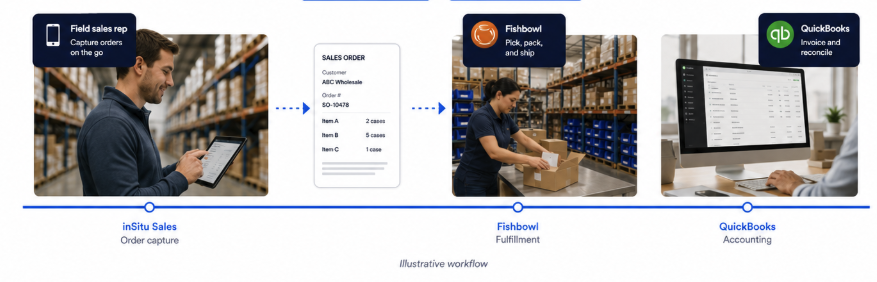
Connect Fishbowl Inventory with mobile field sales, DSD, customer order taking, warehouse fulfillment, and your configured QuickBooks workflow.


ONE CONNECTED ORDER JOURNEY
See the order move—and know what happens next.
inSitu Sales extends Fishbowl Inventory to the customer-facing workflows that start before the warehouse receives the order.
FISHBOWL MOBILE SALES EXTENSION
Bring Fishbowl inventory context closer to every customer conversation.
Field users work in a focused inSitu Sales experience instead of navigating the full inventory system. Access remains limited by assigned accounts, roles, and configured data.
Explore mobile field salesField sales & pre-sales
Capture customer orders in the field, including when connectivity is unreliable.
DSD & route sales
Give route teams an order-taking workflow designed for customer stops and mobile execution.
Private B2B ordering
Connect authorized customer reorders to the same operational order path.
CONNECTED DATA, CLEAR RESPONSIBILITIES
Use Fishbowl as the operational inventory hub.
Keep the warehouse centered in Fishbowl while inSitu Sales gives approved users a purpose-built mobile layer for selling, ordering, and route execution.
The context reps need to sell
- Assigned customers
- Products and item details
- Configured pricing
- Available inventory context
- Warehouse information
The activity the back office needs
- Customer orders
- Order-line details
- Configured customer updates
- Workflow status context
- Payment records when enabled
Supported records, directions, timing, mappings, and rules depend on your Fishbowl and inSitu Sales configuration.
+
FISHBOWL + QUICKBOOKS WORKFLOW
Connect field execution without replacing your accounting process.
For distributors using Fishbowl with QuickBooks, inSitu Sales can extend the configured order and payment workflow to mobile teams. Fishbowl remains central to inventory operations, while QuickBooks remains part of the accounting path.
- No duplicate order entry for the configured workflow
- Focused mobile permissions for field users
- Online and offline order taking
FISHBOWL INTEGRATION FAQ
Questions before you connect.
We’ll confirm your Fishbowl version, current QuickBooks path, required records, mappings, and user permissions before defining the integration workflow.
What is the inSitu Sales Fishbowl Inventory integration?+
It connects mobile sales and order-taking workflows with a configured Fishbowl Inventory process, helping distributors move orders from customer-facing teams toward warehouse fulfillment without duplicate entry.
Can sales reps see Fishbowl inventory on a mobile device?+
inSitu Sales can make configured inventory and warehouse context available to approved mobile users. What each rep sees depends on the account setup, permissions, and synchronization configuration.
Does the Fishbowl integration work with QuickBooks?+
The integration is designed for distributors that use Fishbowl alongside a QuickBooks accounting workflow. The exact record path and timing depend on the configured Fishbowl, QuickBooks, and inSitu Sales setup.
Can reps take Fishbowl orders offline?+
inSitu Sales supports offline mobile order taking. Reps can continue working when connectivity is unreliable and synchronize their activity after the device reconnects.
Is every Fishbowl record synchronized in both directions?+
No universal direction should be assumed. Supported records, direction, timing, mappings, and business rules are established during integration configuration.
READY TO CONNECT THE FIELD TO FISHBOWL?