
B2B ECOMMERCE PLATFORM FOR WHOLESALE DISTRIBUTORS
Give every customer a faster way to reorder.
Launch a branded B2B ecommerce customer portal with the catalogs, pricing, terms, order history, invoice access, and configured payments each account expects—on your company’s own domain.
Wholesale ordering with account-controlled pricing and access.

Fewer order-entry tasks
Reduce manual entry from phone, email, and fax orders.
24/7 customer ordering
Let approved accounts reorder on their schedule.
One connected workflow
Move portal orders into operations and the back office.
B2B CUSTOMER PORTALS, EXPLAINED
Products, prices and account access are different controls.
inSitu Sales is a B2B ordering portal for wholesale distributors. It connects customer-specific catalogs and price lists with account access, ordering, reordering and back-office workflows. The catalog determines the product assortment; a price list determines what an account pays; permissions determine what the buyer can view and do.
A distributor can expose product browsing while requiring sign-in to see prices. Public catalog browsing does not establish access to private prices, order history or invoices. Configure and test the intended experience for visitors and approved accounts separately.
CUSTOMER-SPECIFIC CATALOGS AND WHOLESALE PRICE LISTS
Give the right buyer the right commercial context.
A product being visible, priced and available to order are separate decisions. Make each rule explicit before launch.
| Control | What it determines | Practical example |
|---|---|---|
| Catalog / assortment | Which products and categories are presented to a buyer. | A restaurant account and a retail account may need different product selections. |
| Price list / terms | The assigned prices and commercial conditions for the account. | Two approved accounts can buy the same item under different assigned price lists. |
| Account / permissions | Who can sign in and access ordering or account records. | A visitor can browse a public product card while its price is behind sign-in. |
Examples illustrate configuration choices, not the private settings of the customer storefronts below. Confirm product visibility, units, prices and permissions using representative accounts.
FROM BUYER INTENT TO OPERATIONAL ACTION
One order keeps its context from portal to delivery.
Replace disconnected web orders and duplicate entry with a structured wholesale workflow.
- 01
Recognize the account
Authenticate the buyer and apply the customer’s catalog, pricing, terms, and permissions.
- 02
Capture the order
Preserve products, quantities, units, notes, and delivery context in one structured transaction.
- 03
Prepare fulfillment
Make the order available to inventory, warehouse, approval, and fulfillment workflows.
- 04
Complete and synchronize
Connect dispatch, delivery, reporting, and the ERP or accounting record.
A BETTER SELF-SERVICE BUYING EXPERIENCE
Make repeat wholesale orders easier without flattening customer-specific rules.
Give buyers the convenience they expect while your team stays in control of access, assortment, pricing, and downstream processing.
Walk through your ordering workflowAccount-specific storefronts
Show each approved buyer the assigned catalog, products, price list, terms, and ordering permissions.
Fast product discovery
Help customers search, browse categories, review product details, and build orders without calling a representative.
Order history and reordering
Let buyers revisit previous purchases and repeat common orders from a self-service account.
Invoice access and online payments
Let authorized customers review open invoices and, when online payments are enabled and configured, submit payment through the portal.
Your brand and your domain
Launch the B2B customer portal on your company’s domain or subdomain, subject to DNS and deployment configuration.
Promotions and customer notifications
Use the optional white-label app to send promotional push notifications, subject to customer device permissions and your notification setup.
Structured orders
Capture the customer, products, quantities, pricing, notes, and delivery context your operation needs downstream.
SEE REAL CUSTOMER STOREFRONTS
Two industries. Their own branded ordering experience.
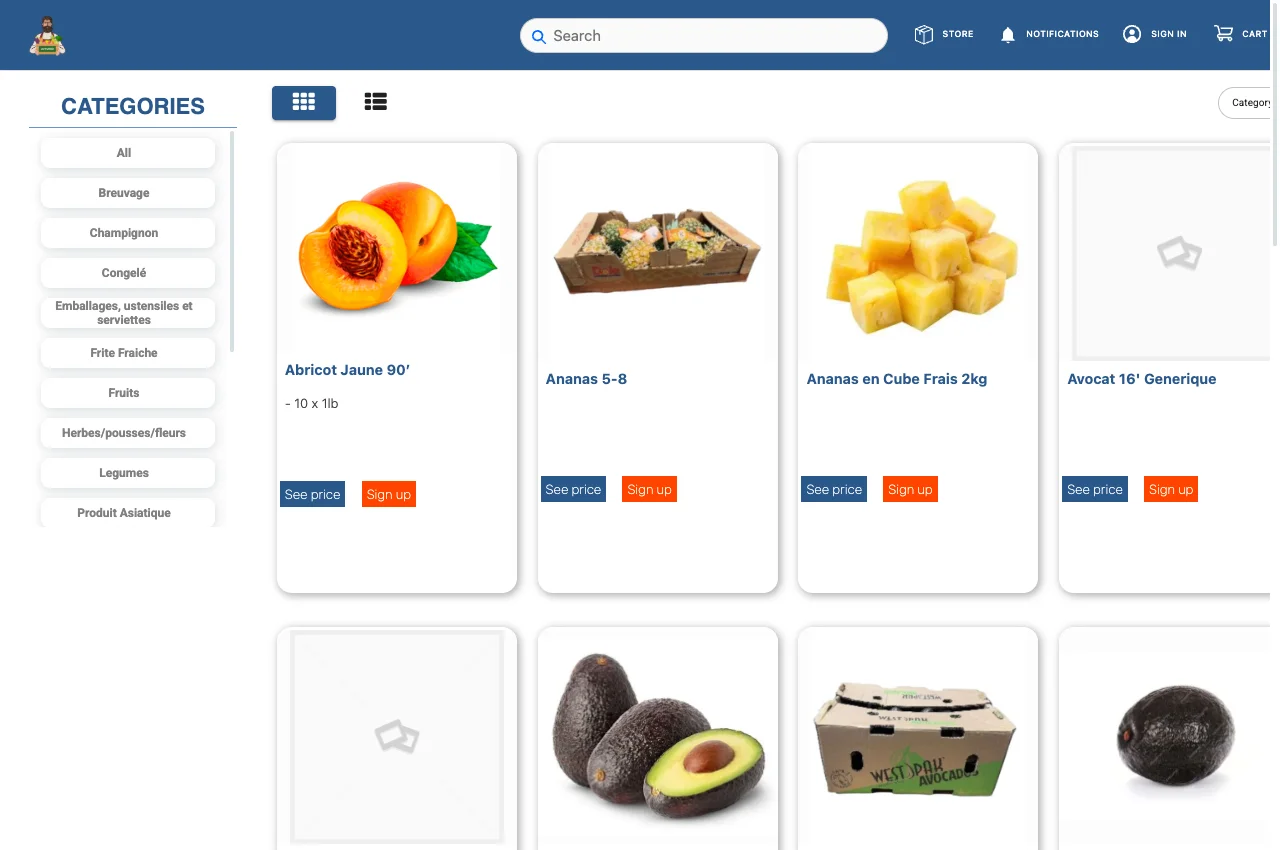
Lefruitier and PhysioTech show how product discovery can be public while pricing access starts with sign-in. These captures show public browsing, not a private customer account or a completed order.
LIVE CUSTOMER EXAMPLE
Distribution Lefruitier
The public produce catalog shows categories, product names and pack descriptions. Product cards display “See price” links that lead to sign-in. Its published case study describes B2B ordering connected with web order-to-invoice conversion and QuickBooks.
Explore the public storefront ↗ · Read the published case study
LIVE CUSTOMER EXAMPLE
PhysioTech
The branded equipment and supplies storefront shows categories, product identifiers and descriptions. Public product cards also display “See price” links. Its published case study describes B2B ordering with ShipStation and QuickBooks.
Explore the public storefront ↗ · Read the published case study
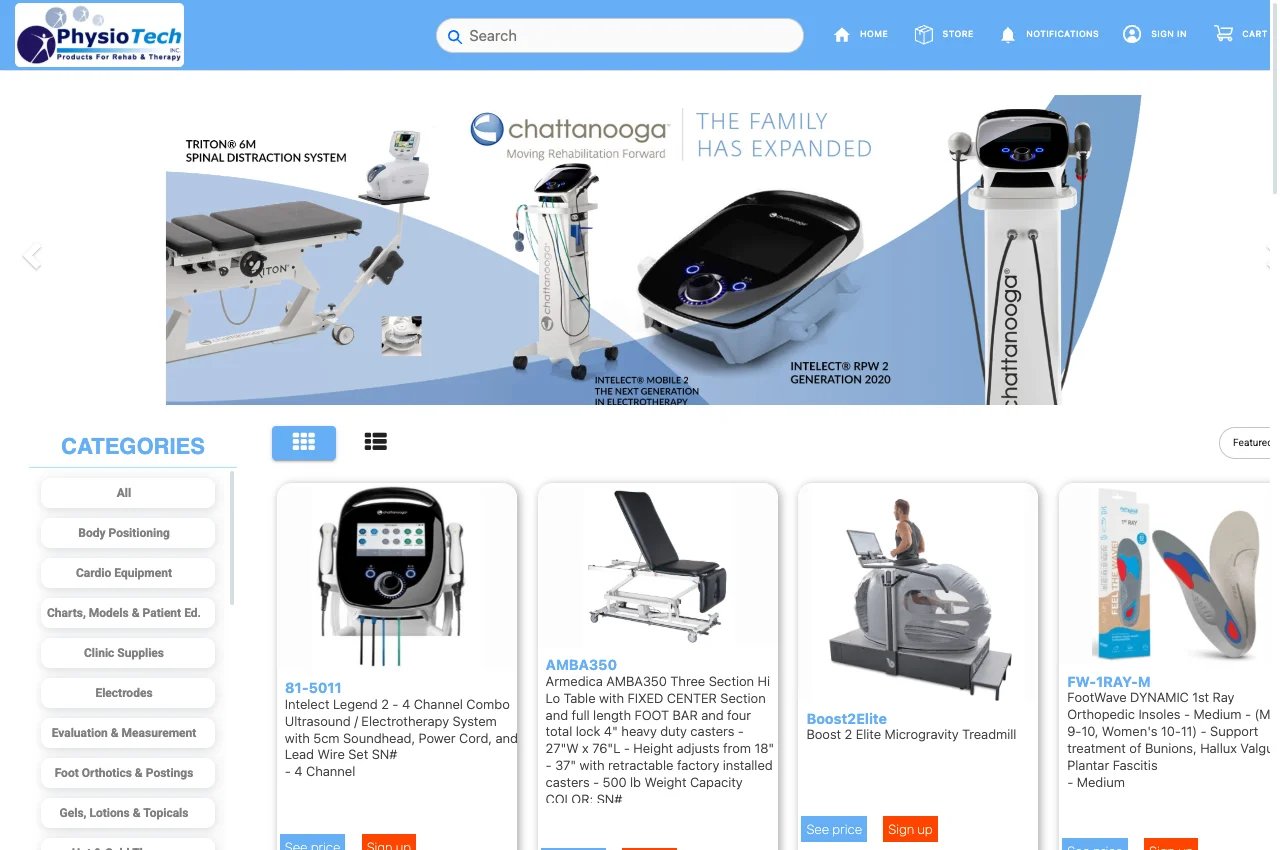
Observed in signed-out browsers on September 6, 2026. Account-specific prices, restricted assortments, invoice access and checkout were not tested in these customer portals. Layouts and product availability can change.
AI-POWERED REORDERING
Powerful reordering with AI recommendations.
Help buyers and sales teams start with a smarter draft instead of a blank cart. AI can combine customer purchase history, reorder cadence, account pricing, product availability, and your distributor’s business rules to recommend likely items and quantities.
Start with purchase history
Recognize repeat patterns and likely replenishment timing for each account.
Apply operational context
Consider pricing, product availability, and the rules that make your business different.
Keep people in control
Let buyers or authorized team members review, edit, and approve every recommendation.
AI recommendations are suggestions—not automatic orders.
SEE AI REORDERING IN A DEMO- Frequently reordered itemsRepeated across recent account ordersHigh confidence
- Items approaching reorder cadenceTiming aligns with the customer’s purchase patternHigh confidence
- Available complementary itemsInventory and distributor rules support the suggestionMedium
Recommendations are editable. No order has been submitted.

OPTIONAL WHITE-LABEL CUSTOMER APP
Add a branded mobile app when the web portal is not enough.
The B2B Ecommerce Customer Portal remains the core ordering solution. Add a white-label customer app when your distributor needs a mobile presence published under its own brand.
- Your brand, icon, and supported storefront presentation
- Mobile ordering and purchase-history access
- Promotional push notifications to customers, subject to device permissions and configuration
- Barcode scanning plus Apple App Store and Google Play distribution
CONNECTED TO THE REST OF THE OPERATION
Your ecommerce channel should not become another silo.
Connect online orders with the teams and systems that price, fulfill, deliver, and account for them.
Customer & pricing
Accounts, catalogs, price lists, terms, products, units, promotions, and permissions.
Inventory & fulfillment
Order review, availability context, picking, packing, staging, and warehouse workflows.
Dispatch & delivery
Routes, delivery status, proof, returns, and customer follow-through.
ERP & analytics
QuickBooks or ERP synchronization, reporting, and connected operational analysis.





CUSTOMER SUCCESS
RGRooted Grounds Coffee Company
Branded B2B coffee ordering, flexible fulfillment, and QuickBooks in one connected flow.
Read the published case study- 300+ active B2B portal users
- 1,100+ B2B portal orders · Jan 1–Aug 25, 2026
- 40,000+ portal-ordered units/items
Rounded operational measures corroborated against inSitu Sales platform data; confidential financial values are excluded.
THREE QUESTIONS FOR YOUR DEMO
Test your buyer rules from sign-in to the back office.
Bring a sample catalog, two customer scenarios and the name and edition of your accounting or ERP system.
What will two different customers see?
Bring two test accounts with different assortment or price-list assignments. Compare the same product, unit and price, then test the signed-out view. Verify that each account can access only its own permitted records.
How will a repeat order behave today?
Start with a previous order, change quantities and review current prices, units and availability before submission. Check any minimums, payment terms or delivery rules your configuration requires.
What happens after the buyer submits?
Follow a test order through office review, fulfillment and the configured accounting or ERP connection. Agree on record ownership, sync timing, status visibility and how the team handles a rejected or failed synchronization.
Confirm the setup before launch
Catalog visibility and permissions depend on configuration. Invoice payments require an enabled payment setup. A custom domain requires DNS and certificate configuration. Integration objects, direction and timing vary by connector; an online order is not a promise of instant ERP posting or immediate fulfillment.
Starter B2B Ecommerce is $200/month with 3 users included and unlimited admin and customer accounts. Pro adds field sales at $329/month. Optional services and applicable integration setup fees are separate. Review current pricing and fee details.
B2B ECOMMERCE FAQ
Questions wholesale distributors ask before launching a portal.
Clear answers about catalogs, prices, account access, reordering and the back office.
What is the difference between a customer-specific catalog and a price list?+
A catalog determines the products presented to an account. A price list determines the assigned price for those products. Two customers can share a product assortment but have different prices, or have different assortments. Configure and test catalog assignment, price lists, units and permissions as separate requirements.
Can visitors browse products without seeing wholesale prices?+
Yes, a configured storefront can allow public product browsing while requiring sign-in to see prices. The public Lefruitier and PhysioTech storefronts showed this pattern when checked on September 6, 2026. That observation does not verify private account pricing, restricted catalogs or checkout behavior.
What happens to a B2B order after submission?+
A portal order can enter the configured inSitu office, inventory, fulfillment and back-office workflow. Confirm approval steps, availability checks, record ownership, integration objects and sync timing for your setup. Order submission does not guarantee immediate fulfillment or instant posting to an accounting system.
What is a B2B ecommerce platform for wholesale distributors?+
A B2B ecommerce platform gives approved business customers a private, self-service way to browse their assigned catalog, see account-specific pricing, place orders, and reorder. For wholesale distributors, the portal should also keep customer, product, pricing, inventory, fulfillment, delivery, and accounting data connected.
Can every customer see different products and pricing?+
inSitu supports account-specific catalogs and price lists. Catalog assignment controls the assortment; price-list assignment controls prices. Confirm each customer’s product visibility, units, terms and ordering permissions during configuration and test them with separate accounts.
Can customers reorder from their purchase history?+
Yes. Approved buyers can use order history and repeat-order tools to place recurring wholesale orders without waiting for a sales representative to re-enter them.
Can customers review and pay invoices through the portal?+
Authorized customers can review available invoice information and, when online payments are enabled and configured for the distributor, submit payments through the B2B customer portal. The exact payment flow depends on the distributor’s configuration, payment provider, and connected systems.
Can we use our own domain for the B2B customer portal?+
Yes. The portal can be launched on a company-owned domain or subdomain, such as orders.yourcompany.com, subject to DNS, security certificate, and deployment configuration.
Can we send promotional push notifications to customers?+
The optional white-label customer app can support promotional push notifications. Delivery depends on customer device permissions, app-store requirements, and the distributor’s notification setup.
How do AI reorder recommendations work?+
AI recommendations can analyze customer purchase history, reorder cadence, customer-specific pricing, product availability, and distributor-defined business rules to suggest likely items and quantities. Recommendations remain editable and reviewable; no order is submitted until an authorized buyer or team member approves it.
Does the B2B ordering portal connect with QuickBooks or an ERP?+
inSitu Sales supports connections with QuickBooks, NetSuite, SAP Business One, Odoo, Xero, and other systems through available integrations and APIs. The exact data flow depends on the distributor’s configuration and system of record.
What is the difference between the portal and the white-label customer app?+
The B2B Ecommerce Portal is the main web ordering solution. The White-Label Customer App is an optional mobile add-on for distributors that want an app published under their own brand, with supported features such as mobile ordering, push notifications, barcode scanning, and purchase-history access.
Can the portal work with field sales, warehouse, and delivery teams?+
Yes. Online customer orders can enter the same connected inSitu workflow used for customer records, pricing, inventory, fulfillment, dispatch, delivery, analytics, and ERP or accounting synchronization.
Can buyers place orders outside business hours?+
Yes. The portal gives approved customers a 24/7 ordering channel. Availability, pricing, terms, payments, and order-processing rules remain controlled by the distributor’s configuration.
READY TO IMPROVE WHOLESALE REORDERING?
See how the portal fits your customers and operation.
Bring your catalog, pricing, fulfillment, delivery, and ERP requirements. We’ll map the ordering flow around your business.