
PRE-SALES SOFTWARE FOR WHOLESALE DISTRIBUTORS
Mobile order taking for small distributors.
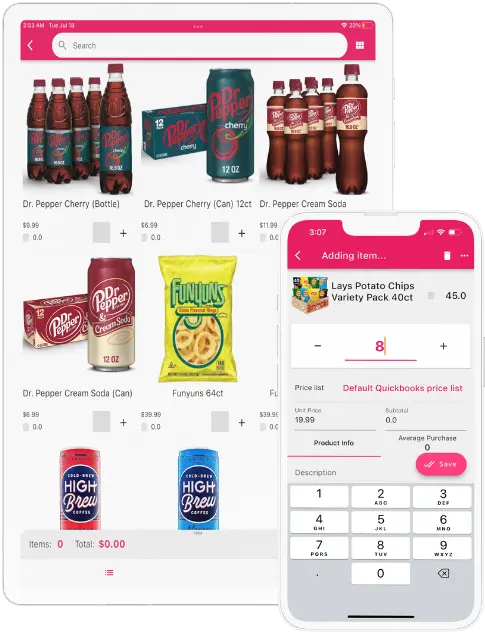
Give your sales reps customer pricing, inventory, and order history wherever they sell—even offline. Capture orders in the field and keep your office and accounting workflow connected.
Starter App: $200/month, including 3 app users. Try free for 14 days. No credit card required. View plans and setup details.
- Works offline
- Customer-specific pricing
- ERP-connected
 3. Warehousepicks & fulfills
 4. Delivery teamcompletes the order
INTEGRATES WITH YOUR ERP




 Business Central
WHAT IS PRE-SALES SOFTWARE?
Pre-sales software connects your field reps, your office, your warehouse, and your ERP.
Pre-sales software for wholesale distributors helps representatives plan customer visits, work from account-specific products and prices, capture orders online or offline, and send clean order data to the office for review, fulfillment, and later delivery.
Explore field sales softwareTHE CONNECTED ORDER JOURNEY
From route plan to delivered order
Keep the customer, pricing, order, fulfillment, and delivery context in one connected process.
1. Plan route
Assign customers, territories, visit goals, and the route each rep will follow.
2. Take order
Use the right catalog, pricing, available inventory, history, and promotions—even when the rep is offline.
3. Sync & approve
Send the order to the office and connected system for review, pricing, and approval.
4. Pick & fulfill
Give the warehouse a structured order with the items, quantities, and requested delivery context.
5. Deliver
Schedule and complete delivery while keeping the order record connected from visit to customer.

MOBILE ORDER TAKING FOR WHOLESALE REPS
Capture accurate orders every time in the field.
Replace paper order forms and calls back to the office with the customer, product, pricing, inventory, history, and route context the representative needs at the point of sale.
Assigned catalogs & price lists
Show each rep the products, units, and customer-specific prices they are authorized to use.
Product inventory visibility
Review available inventory levels from the connected system so reps can set better expectations before submitting the order. Availability depends on synchronization and configuration.
Promotions & discounts
Apply configured customer and item promotions while the rep builds the order.
Barcode scanning
Find products faster by scanning a barcode from a supported iOS or Android device.
Customer history at your fingertips
Review previous orders, invoices, activity, and buying patterns before recommending the next item.
Offline first, always in sync
Capture orders without a connection and synchronize after reliable service returns.
FROM ORDER TO WAREHOUSE
From field order to a clear pick and fulfillment plan.
After synchronization and any configured review, the order can move into the office and connected system so warehouse teams receive structured item, quantity, customer, and delivery context.
- Orders can flow into the office and connected ERP
- Configured review and approval stay visible
- Item, quantity, and customer context remain attached
- Fulfillment and delivery teams work from one order record

AI-ASSISTED REORDER RECOMMENDATIONS
Help reps start with a smarter, reviewable order.
AI-assisted suggestions can use purchase history, reorder cadence, customer-specific pricing, product availability, and distributor-defined business rules to recommend likely order lines.
- Personalize the starting point for each customer
- Surface likely replenishment items
- Keep recommendations editable by the representative
- Require authorized review before order submission
Recommendations are suggestions, not autonomous orders. People remain in control.
CUSTOMER-REPORTED RESULTS
Customer-reported results from the published Asian Wholesale Grocers field sales case study. Results are not presented as a pre-sales-specific outcome.
Read the customer story
PRE-SALES SOFTWARE FAQ
Answers to common pre-sales questions.
Clear answers for wholesale sales, operations, warehouse, and IT teams evaluating a mobile pre-sales workflow.
What is pre-sales software?+
Pre-sales software helps field representatives capture customer orders before warehouse fulfillment and delivery. It gives reps access to assigned products, customer-specific pricing, order history, promotions, route context, and order-entry tools while keeping the resulting order connected to the office and accounting or ERP system.
How is pre-sales different from direct store delivery?+
In a pre-sales workflow, a sales representative takes the order during the customer visit and the warehouse fulfills it for a later delivery. In direct store delivery, or DSD, the route team typically carries truck inventory and can sell, invoice, collect payment, and deliver during the same stop.
Can sales reps take orders without internet access?+
Yes. Representatives can continue taking orders and updating customer activity offline. Their work is stored on the device and synchronized when a reliable connection returns.
Can sales representatives see product inventory levels?+
Yes. Representatives can review available product inventory from the connected inSitu Sales and accounting or ERP data used by their company. What appears in the app depends on warehouse scope, synchronization timing, permissions, and configuration, so availability should be confirmed before committing an order.
Does inSitu Sales connect with QuickBooks or an ERP?+
inSitu Sales supports integrations with QuickBooks, Oracle NetSuite, Microsoft Dynamics 365 Business Central, SAP Business One, Odoo, Xero, and other systems through available integrations and APIs. The exact order, customer, item, pricing, and inventory flow depends on the distributor’s system and configuration.
Can each customer have different products, pricing, and promotions?+
Yes. Distributors can configure assigned catalogs, price lists, units, quantity rules, discounts, and promotions by customer or customer group so representatives work from the appropriate commercial terms.
How does the warehouse receive a pre-sales order?+
After synchronization and any configured review, the order can flow into the office and connected system so the warehouse can prepare it for picking and fulfillment. The exact approval, allocation, picking, and delivery process depends on the distributor’s configuration.
How can AI help pre-sales representatives?+
AI-assisted recommendations can use customer purchase history, reorder cadence, pricing, product availability, and distributor-defined rules to suggest likely order lines. Suggestions remain editable and require an authorized person to review the order before submission.
READY TO STREAMLINE PRE-SALES?
Connect your field, office, warehouse, and ERP.
Bring your customers, price rules, route process, fulfillment steps, and business system. We’ll map the demo to the way your team actually sells.